If you have searched for a primary PSN account, secondary PSN account, or the difference between the two, you have probably found several explanations that make the subject more complicated than it needs to be.
The first thing to understand is that “primary account” and “secondary account” are not two official PlayStation Network account types in the way terms such as adult account, child account, or PlayStation Plus membership are. On PS4, Sony officially refers to activating a console as your Primary PS4. On PS5, the corresponding feature is called Console Sharing and Offline Play.
The phrases primary account and secondary account are nevertheless widely used by players, game-sharing communities, and digital-game sellers to describe different ways a PlayStation account and its game licenses can be used on a console.
That distinction matters. Depending on the setup, it can affect whether you play from the account that owns the game or from your personal user, whether other users on the console can launch the game, how offline access works, and what happens if the console activation changes.
This guide explains primary vs secondary PSN accounts for both PS4 and PS5, how digital licenses work, what happens with PlayStation Plus, and what you should check before choosing any game-account-based delivery method.
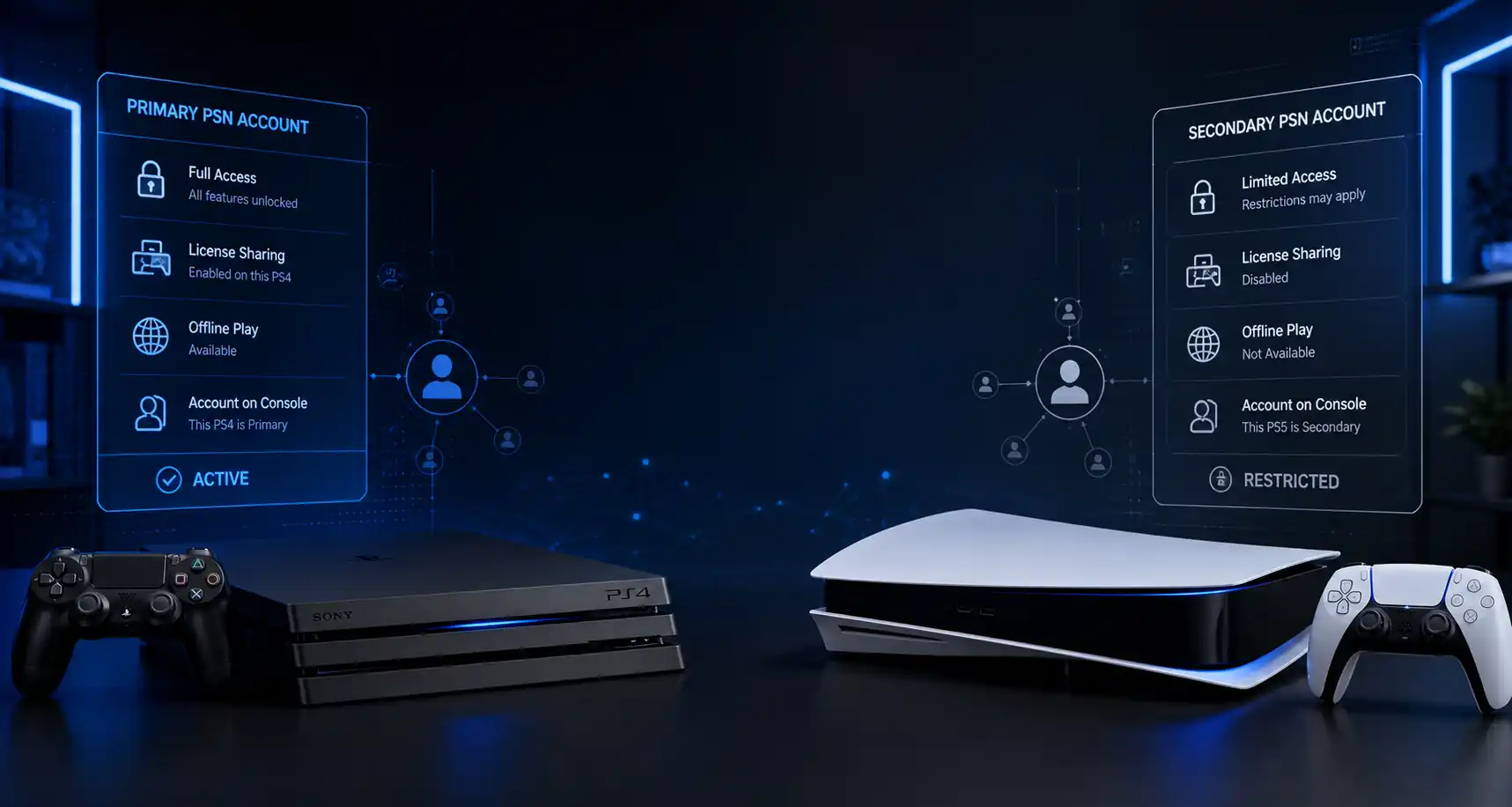
When people ask “What is a primary PSN account?”, they are normally referring to an account whose game licenses are being shared through the console’s primary or console-sharing configuration.
On PS4, the official feature is Activate as Your Primary PlayStation 4. A PlayStation account can have one PS4 console activated as its primary PS4 at a time. When that console is activated, other users on the same console can access eligible applications purchased from PlayStation Store and some PlayStation Plus benefits.
In practical terms, this is why a so-called primary account is attractive for game sharing: after the appropriate account owns and downloads a digital game, eligible games can normally be launched by other users on that activated console.
This means you may be able to play from your own local user or PSN profile rather than continuously using the purchasing account itself.
For PS4 primary account activation, the official path is:
Settings → Account Management → Activate as Your Primary PlayStation 4 → Activate
Only one PS4 can be activated as the primary PS4 for a particular account at a time. However, the same account can also have Console Sharing and Offline Play enabled on one PS5; the PS4 and PS5 activation limits are separate.
This distinction is especially important for users researching primary and secondary PS4 configurations or wondering whether they can use a primary PSN account on a new console.
If the previous PS4 is still activated as primary, the activation may need to be changed before another PS4 can take its place.
A primary-style configuration is usually preferred when the goal is to:
That is why searches such as buy PS4 primary accounts, PS4 account with games for sale, and primary vs secondary account PS4 are common among users looking for lower-cost access to digital games.
However, activation functionality and account ownership are two separate issues. Sony provides console-sharing features for purchases and household-console use, but PlayStation’s current terms also state that account credentials should not be shared and prohibit buying, selling, renting, trading, or transferring accounts or account details.
The definition of a secondary PSN account is less official because Sony does not currently define a PlayStation account category called “secondary.”
In marketplace and game-sharing terminology, a secondary PSN account usually means a setup where the console is not using that account’s primary/shared-console privileges in the same way. As a result, the person may need to use the account that owns the digital game to launch or play the content, depending on the specific setup and license conditions.
This is the key idea behind the primary account and secondary account difference.
A primary-style setup relies on the console-sharing functionality provided by PlayStation. A secondary-style setup generally relies more directly on access through the account that owns the digital entitlement.
Because “secondary” is seller/community terminology rather than an official Sony account class, the exact conditions can vary between vendors. A listing described simply as a PS4 secondary account, PSN secondary account, or secondary PS4 should therefore explain exactly how the game is accessed.
Never assume that every seller uses the term in precisely the same way.
For most users comparing a primary vs secondary PSN account, the deciding factors are profile access, offline use, console activation, convenience, and license dependency.
The following table summarizes the practical distinction.
| Feature | Primary-Style Setup | Secondary-Style Setup |
|---|---|---|
|
Official PSN account type? |
No; refers to console activation/sharing behavior |
No; commonly used marketplace terminology |
|
PS4 equivalent |
Console activated as Primary PS4 for the owning account |
Owning account used without that primary-console relationship |
|
PS5 equivalent |
Console Sharing and Offline Play enabled |
Usually access without relying on shared-console privileges |
|
Play from personal user |
Commonly possible for eligible shared games |
May require playing through the owning account |
|
Offline access |
Supported for eligible content on the shared/activated console |
More dependent on account and license verification |
|
Other users on console |
Can access eligible shared purchases |
Access may be restricted |
|
PS Plus sharing |
Selected benefits can be shared |
Depends on console-sharing configuration |
|
Convenience |
Usually higher |
Usually more restrictive |
|
Dependence on owning account |
Lower during normal shared-console use |
Often higher |
|
Activation changes |
Can affect game access |
License/account access remains important |
The exact result can vary by game, subscription status, account state, region, license, and console configuration.
The simplest way to understand the difference between primary and secondary accounts is this:
Primary-style access is console-focused. Secondary-style access is more account-focused.
With an eligible shared-console setup, the console receives access to certain purchases and benefits belonging to the account that enabled sharing. With a secondary-style arrangement, access may remain more closely connected to signing in with the account that actually owns the game.
This is also why the difference between user and account matters.
A user is the profile you select on your PlayStation console. A PlayStation account is the online identity associated with purchases, trophies, subscriptions, friends, and other PSN services. Multiple users can exist on one console, and multiple PSN accounts can be used on a PS4 or PS5, but the licenses for digital purchases remain associated with the account that acquired them.
The PS4 primary vs secondary account distinction is easier to understand because Sony explicitly uses the word “primary” in the PS4 settings.
Each account can activate one PS4 as its Primary PS4. When this is done, users on that console can access eligible PlayStation Store applications associated with the activating account and some PlayStation Plus benefits.
So, if you have multiple PSN accounts on PS4, each account can independently designate a primary PS4 according to its own activation limit.
That makes configurations involving PS4 multiple accounts, PS4 multiple users, or two PSN accounts on one PS4 possible. What matters is which account owns each license and which console has been activated for that account.
The most relevant PS4 account settings are located under Account Management.
For activation:
Settings → Account Management → Activate as Your Primary PlayStation 4
For license troubleshooting:
Settings → Account Management → Restore Licenses
If a digital game displays a padlock even though you believe you have legitimate access, Sony recommends checking that you are signed in to the account that acquired the content, confirming any relevant PlayStation Plus subscription, verifying primary-console activation where sharing is involved, and restoring licenses if necessary.
Yes. Multiple PSN accounts and multiple local users can exist on the same PS4.
The important distinction is that adding another account to the console does not transfer ownership of its purchases. Instead, eligible content may become available to other users when the purchasing account has activated that console as its Primary PS4.
This explains why simply adding a PSN second account is not the same as gaining ownership of the games on that account.
Users searching primary vs secondary account PS5, primary vs secondary PS5, or PS5 primary account settings should know that PS5 uses different terminology from PS4.
There is no menu called “Activate as Primary PS5.”
Instead, Sony uses Console Sharing and Offline Play.
The setting is located at:
Settings → Users and Accounts → Other → Console Sharing and Offline Play
Only one PS5 console at a time can have Console Sharing and Offline Play enabled for a particular account. When enabled, other users on that PS5 can play eligible games and media purchased by the account, including while the console is offline, and can receive some PlayStation Plus benefits.
This feature is the basis of most PS5 account sharing discussions.
If Account A owns a digital game and enables Console Sharing and Offline Play on a specific PS5, another user on that console may be able to launch the eligible game using User B.
That does not mean User B now owns the game. The digital game entitlement remains connected to Account A.
This difference between access and ownership is one of the most important concepts to understand before using any shared digital-game configuration.
Searches such as PS5 account types, PS5 two types, or PS5 types and differences can create the impression that Sony sells Primary and Secondary PSN account plans.
It does not.
From the perspective of game sharing, users are generally talking about different usage configurations, not different types of PlayStation Network registration.
For PS5, think in terms of:
That model is more accurate than treating “primary” and “secondary” as formal PS5 account classes.
Every digital PlayStation purchase involves a license or digital game entitlement associated with the purchasing account.
When a game launches normally, the console needs to establish that the user or console is entitled to access that content. With the appropriate console-sharing configuration, some of that access can extend to other users on the activated console.
This is why digital license synchronization and console activation matter.
If license information cannot be confirmed, you may see a padlock icon or receive an error. Sony’s troubleshooting guidance recommends signing in to the account that owns the content, checking Console Sharing and Offline Play on PS5 or Primary PS4 activation on PS4, and restoring licenses where appropriate.
Offline availability is one of the biggest differences users notice.
On PS5, Sony explicitly states that when Console Sharing and Offline Play is enabled, users on that PS5 can play eligible purchased and downloaded games even while the console is offline.
On a configuration that does not have those shared-console privileges, access can be more dependent on the purchasing account and successful license verification.
That is why anyone comparing a primary vs secondary PSN account should ask about offline functionality before focusing only on price.
Compatibility is not determined only by whether something is called primary or secondary.
You should also consider:
For users interested in sharing games across PS4 and PS5, remember that PS4 Primary activation and PS5 Console Sharing and Offline Play have separate activation limits. Sony currently allows an account to have one Primary PS4 and one PS5 with Console Sharing and Offline Play enabled at the same time.
The PSN account region can matter for purchases, voucher redemption, and downloadable content.
A PlayStation account’s country or region is chosen when the account is created and cannot normally be changed afterward. PlayStation Store content and services can vary by region, and voucher codes must match the account’s country/region. Sony also notes that an add-on for a disc game may not work when the add-on and disc regions do not match.
For this reason, compatibility of a secondary account with DLC should never be assumed purely from the words “primary” or “secondary.”
Check the game edition, base-game region, DLC region, and account region first.
The PS Plus primary vs secondary question is another area where inaccurate claims are common.
PlayStation allows selected PlayStation Plus benefits to be shared on:
Shared benefits can include online multiplayer, downloaded Monthly Games, eligible catalog games based on the membership tier, and downloaded games purchased using a PlayStation Plus discount.
However, not every PlayStation Plus feature transfers to other users.
Some benefits remain exclusive to the subscribing account, including cloud storage, redeeming PlayStation Plus games on another account, purchasing products using the subscriber discount, and certain trial-related benefits.
|
PlayStation Plus Feature |
Can Be Shared on Eligible Console? |
|---|---|
|
Online multiplayer |
Yes, under supported conditions |
|
Downloaded Monthly Games |
Yes |
|
Eligible Game Catalog titles |
Yes, depending on plan |
|
Eligible Classics Catalog titles |
Yes, depending on plan |
|
Games bought with PS Plus discount |
Downloaded game access can be shared |
|
Cloud save storage |
No |
|
Redeeming Monthly Games onto another account |
No |
|
Buying with another account using subscriber discount |
No |
|
Certain game trials |
No |
So if you see terms such as PS5 account Plus or a PS5 account game listing, verify whether PS Plus is actually included, whether the subscription remains active, and which benefits are expected to work on your personal user.
Primary and secondary configurations can work smoothly when the licenses, console settings, and account ownership are understood. Most problems start when one of those elements changes.
A padlock next to a digital game does not necessarily mean the account itself has been banned or permanently locked.
It can indicate a licensing or network problem.
Useful checks include:
If access came from another account and its console-sharing configuration changes, your access may also change.
On PS4, deactivating the console as the account’s Primary PS4 removes the primary-console relationship.
On PS5, disabling Console Sharing and Offline Play similarly removes the shared-console configuration for that account on that PS5.
That can affect whether other users on the console can continue accessing eligible games and benefits associated with the owning account.
This is why activation control is important when comparing a primary account vs secondary account PlayStation setup.
For modern consoles, an account can currently have:
| Console | Relevant Activation Limit |
|---|---|
|
PS4 |
One Primary PS4 |
|
PS5 |
Console Sharing and Offline Play on one PS5 |
|
PS4 + PS5 together |
One of each can be enabled |
Sony also provides remote deactivation options, but remote deactivation of all devices is subject to limits and should not be treated as an everyday account-management method.

Users searching phrases such as buy primary PSN account, buy secondary PSN account, cheap PS4 accounts, PS4 game accounts for sale, PSN account shop, or best place to buy game accounts are usually trying to achieve one goal: access digital games at a lower price.
Price, however, should not be the only consideration.
Before purchasing any digital PlayStation product from PSNShop or another marketplace, understand exactly what is being sold. A digital game code, wallet voucher, access method, and transfer of account credentials are not the same product.
That distinction is particularly important because PlayStation’s current Terms of Service prohibit sharing, buying, selling, renting, trading, or transferring accounts and account credentials, and Sony’s security guidance advises users not to share account details.
If you encounter listings promoted with phrases such as secure PSN account purchase, trusted PSN account marketplace, verified PSN account vendor, or risk free PSN account purchase, do not rely on the marketing phrase alone.
Check the actual conditions.
|
What to Check |
Why It Matters |
|---|---|
|
Delivery method |
Clarifies whether you receive a voucher, code, access method, or credentials |
|
PS4 or PS5 compatibility |
Prevents buying access intended for the wrong console |
|
Primary/secondary meaning |
Seller terminology can vary |
|
Game edition |
Standard, Deluxe, cross-gen, DLC and other editions may differ |
|
Region |
Can affect vouchers, Store content and DLC compatibility |
|
Offline access |
Important for users with limited connectivity |
|
Personal-profile play |
Some setups may require the owning account |
|
Activation requirements |
Determines how the console must be configured |
|
PS Plus dependency |
Subscription-based games can require an active membership |
|
Support policy |
Important if activation or license access fails |
A clear listing at PSNShop should tell you these conditions before checkout instead of relying on labels such as “primary,” “secondary,” “premium,” or “full access” without explanation.
The best buyer experience is usually not defined by how quickly login details arrive. It is defined by whether the customer understands the product before paying.
A buyer choosing a primary-style option typically values convenience: downloading the game, using the correct console-sharing configuration, and then playing eligible content from a personal profile.
A buyer choosing a secondary-style option is generally accepting more restrictions in exchange for a potentially different price point. The most common frustration occurs when the customer expects primary-style features—such as personal-profile or offline access—from a product that was sold as secondary.
Security concerns also become more important whenever an arrangement depends on account credentials. PlayStation recommends keeping login information private, using strong authentication, and avoiding sign-ins on devices that are not controlled by you or trusted people.
For PSNShop, the strongest approach is therefore transparent product information: define the activation method, supported console, region, game edition, expected restrictions, and support process before a customer chooses an option.
You can have multiple PSN accounts on the same console, but “two primary accounts” is misleading terminology. Each PlayStation account can independently designate one PS4 as its Primary PS4, and each account can enable Console Sharing and Offline Play on one PS5. Therefore, several accounts on one physical console may each use their own permitted activation, subject to PlayStation’s activation rules.
A secondary account is not an official Sony account type, so safety depends heavily on what the seller means by “secondary.” If the arrangement requires someone else’s login credentials, there are additional security and platform-policy concerns. Sony advises users not to share account details, and its Terms of Service restrict buying, selling and transferring accounts. Always understand the delivery and access method before purchasing.
Primary-console activation alone does not automatically give every account PlayStation Plus. However, selected PlayStation Plus benefits—including online multiplayer—can be shared with users on one Primary PS4 and one PS5 with Console Sharing and Offline Play enabled, provided the subscribing account remains eligible and the game or service supports the feature.
Do not assume that a secondary setup supports offline play. On PS5, Sony specifically supports offline access for eligible purchases through the console where Console Sharing and Offline Play is enabled. Secondary-style arrangements can depend more heavily on the owning account and license verification. If offline access matters to you, confirm the exact activation method before choosing an account option.
There is no official PlayStation setting that switches an account between “primary” and “secondary” types. On PS4, you change whether the console is activated as the account’s Primary PS4. On PS5, you enable or disable Console Sharing and Offline Play. If a seller uses Primary and Secondary labels, those labels describe its access method rather than a formal PSN account conversion.
For users comparing primary-style and secondary-style access, the primary configuration is generally more convenient because eligible content can be shared with other users on the activated console and supported offline play is available. Whether a specific commercial offer is worthwhile depends on its price, region, game edition, access conditions, support policy and compliance with PlayStation’s current terms—not simply the “Primary” label.
Sony officially supports sharing eligible purchases and selected PlayStation Plus benefits through Primary PS4 activation and PS5 Console Sharing and Offline Play. That is different from sharing account credentials or buying and selling PSN accounts. PlayStation’s security guidance tells users to keep account information private, so console sharing and credential sharing should not be treated as the same thing.