Moving from PS4 to PS5 does not automatically mean you need to replace every game in your library. The vast majority of PS4 titles are playable on PS5 through backward compatibility, and selected PS4 games can even benefit from Game Boost, which may provide smoother or higher frame rates without requiring a separate native PS5 version.
The bigger question is whether a dedicated PS5 edition gives you enough extra value to justify downloading, upgrading, or buying it.
For some games, the difference is substantial: higher frame rates can make combat dramatically more responsive, loading screens almost disappear, DualSense features improve immersion, and visual upgrades make a replay feel noticeably more modern. Other titles already perform well enough through backward compatibility that the PS4 version may remain perfectly acceptable.
This guide compares the factors that actually matter when deciding which PS4 games are worth upgrading to PS5, including graphics, performance, loading, DualSense support, save transfers, free and paid upgrade paths, and several games with the best PS5 upgrades.
“Console generational leaps have always reshaped how developers design games. To understand how we went from 32-bit CD pixels to lightning-fast SSD architectures, read our complete timeline of PlayStation generations from PS1 to PS5.”
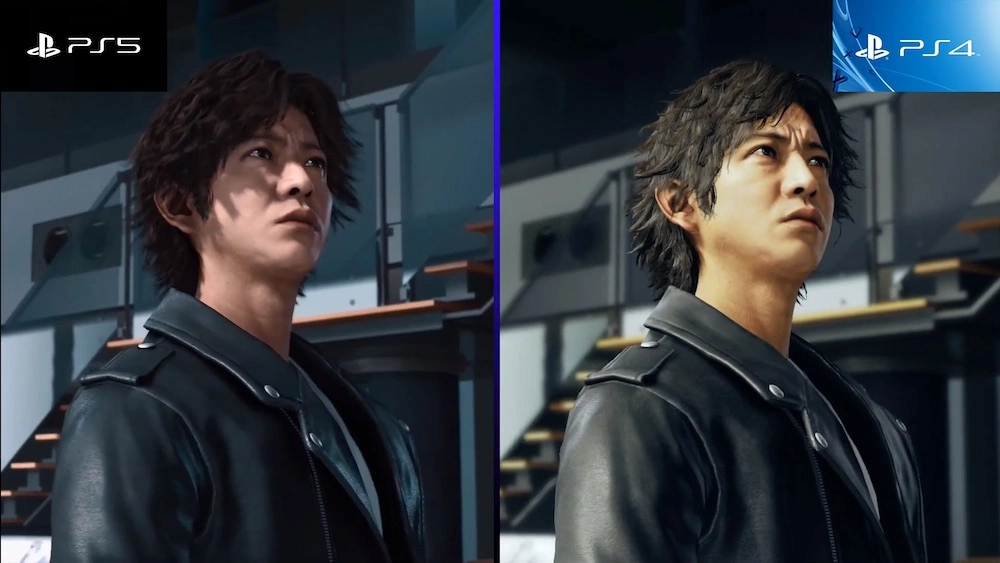
A native PS5 version is different from simply running a PS4 game on a PS5 console.
Backward compatibility allows most PS4 games to run on PS5, while Game Boost can improve performance in selected titles. A dedicated PS5 version, however, can be designed specifically around PS5 hardware and may introduce higher-resolution graphics, improved frame rates, much faster loading, 3D audio, DualSense haptic feedback, adaptive triggers, PS5-specific interfaces, or additional content.
The exact improvements depend entirely on the game. There is no universal rule saying every PS5 edition runs at 4K and 60 FPS or supports every DualSense feature.
That is why PS4 vs PS5 versions compared should always be evaluated title by title.
| Upgrade area | PS4 version on PS5 | Native PS5 version |
|---|---|---|
| Basic compatibility | Usually available for supported PS4 games | Designed specifically for PS5 |
| Frame rate | Original limits or Game Boost improvements | May offer dedicated performance modes |
| Resolution | Usually PS4/PS4 Pro profile | May provide higher resolution or improved assets |
| Loading | Often improved by PS5 hardware | Can be specifically optimized for PS5 SSD |
| DualSense features | Usually limited | Haptics/adaptive triggers may be supported |
| 3D Audio | Varies | Often more extensively integrated |
| New content | Usually unchanged | Some remasters/Director’s Cuts add content |
| Save transfer | PS4 save generally usable for PS4 version | Import method varies by game |
| Upgrade cost | Not applicable | Free, paid, discounted, or unavailable depending on game |
PlayStation’s official upgrade system reflects this variation. Eligible PS4 games may offer a free PS5 upgrade, a discounted paid upgrade, or an offer available only under particular conditions. An internet connection is required to claim these upgrade offers.
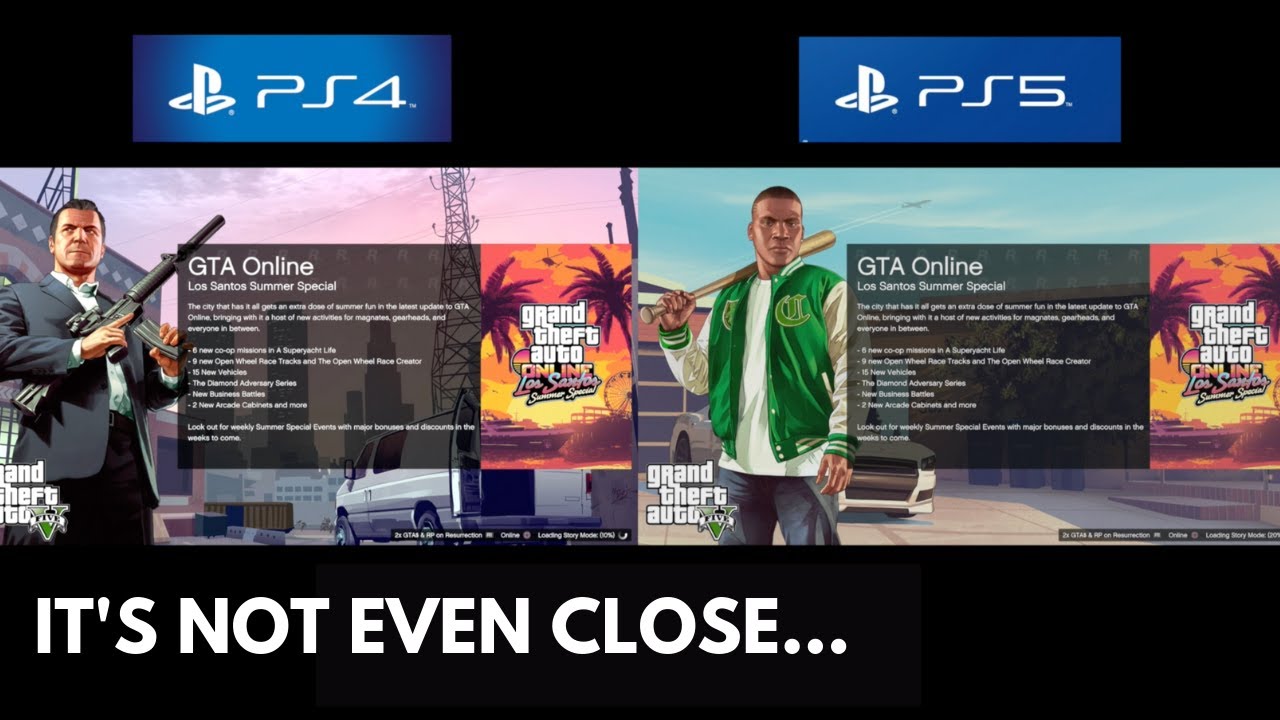
A PS4 vs PS5 graphics comparison is often the first thing people look at, but resolution alone does not determine whether an upgrade is worthwhile.
Native PS5 editions can use higher-quality assets, improved shadows, denser environments, better reflections, more detailed textures, stronger effects, higher rendering resolutions, or combinations of these enhancements. Some games instead use the extra hardware primarily to increase frame rate.
Horizon Forbidden West is a good example. Its PS5 version supports high-resolution visual presentation and a Performance Mode targeting 60 FPS, while also using PS5-specific features such as fast loading, haptic feedback, adaptive triggers, and 3D audio.
Ghost of Tsushima Director’s Cut similarly uses a PS5-specific presentation with dynamic 4K targeting 60 FPS alongside additional console features.
The visual difference matters most when you are playing on a larger 4K display and sitting close enough to notice improved image quality. On a smaller 1080p screen, moving from 30 FPS to 60 FPS may be far more noticeable than an increase in resolution.
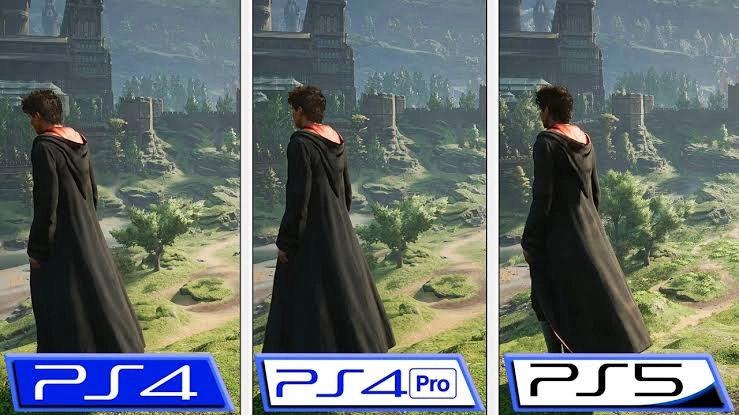
A visual upgrade has greater value when the original game relies heavily on landscapes, detailed character models, cinematic presentation, or fast movement.
Open-world titles such as Horizon Forbidden West and Ghost of Tsushima benefit because players spend dozens of hours looking across detailed environments. Story-heavy remasters such as The Last of Us Part II Remastered can benefit from enhanced presentation because facial animation, lighting, and environmental detail are central to the experience.
If you already completed a game recently and are not planning another playthrough, however, improved graphics alone may not justify paying again.
“Looking to pick up cross-gen titles at a discount with verified digital rights? Browse our updated list of the best PS4 and PS5 games available on full access accounts.”
For many players, frame rate is the strongest reason to choose the PS5 version.
Going from approximately 30 FPS to a mode targeting 60 FPS can improve controller response, camera movement, combat readability, aiming, traversal, and the overall feeling of smoothness. This difference is especially noticeable in action games.
PlayStation’s Game Boost technology can already provide faster or smoother frame rates in selected PS4 games, which means a native upgrade is not always necessary solely for performance.
Native PS5 versions can go further by offering dedicated graphics modes. Death Stranding Director’s Cut, for example, was designed with a Performance Mode using scaled 4K at up to 60 FPS and a Fidelity Mode using native 4K, both with HDR support.
This creates an important distinction when evaluating PS5 game upgrades:
If the PS4 version already receives a stable performance boost on PS5, the upgrade needs to offer something else. If the native version adds a meaningful jump from 30 FPS to a well-optimized 60 FPS experience, the upgrade becomes much easier to recommend.
Loading is one of the improvements that can change how a game feels without changing how it looks.
PS5’s SSD allows developers to build native games around much faster data access. PlayStation describes the console’s SSD as enabling extremely fast loading in installed PS5 games, although the exact improvement depends on how each developer uses the hardware.
Horizon Forbidden West demonstrates the practical benefit clearly: its PS5 features specifically include much faster travel and loading, allowing players to return to the game world quickly after fast travel.
Loading improvements become particularly valuable in games where you frequently:
Saving several seconds once is not impressive. Saving those seconds hundreds of times across a 50-hour game can be.
For that reason, loading speed should be part of any serious PS4 vs PS5 versions compared evaluation.
“The near-instant load times in PS5 upgrades aren’t just software magic—they rely entirely on the console’s custom architecture. To see how this hardware advantage impacts real-world performance, check out our guide on best PS4 and PS5 games available on full access accounts.”
The DualSense controller is one area where native PS5 games can provide an experience that backward-compatible PS4 versions generally cannot reproduce in the same way.
Adaptive triggers can vary resistance according to an in-game action, while haptic feedback provides more detailed vibration patterns than traditional rumble. PlayStation describes these systems as allowing developers to communicate sensations such as weapon resistance, environmental surfaces, impact, and other physical interactions through the controller.
Horizon Forbidden West uses the adaptive triggers for actions including drawing Aloy’s bow and interacting with equipment, while its haptic system communicates combat and environmental effects.
Ghost of Tsushima Director’s Cut adds DualSense haptic feedback and adaptive trigger resistance alongside 3D Audio.
The Last of Us Part II Remastered includes full DualSense integration as part of its PS5-specific feature set.
These features rarely transform a bad game into a good one. But in a game you already enjoy, they can make a second playthrough feel more tactile and modern.
One of the most important questions behind should I upgrade PS4 games to PS5 is whether the upgrade costs anything.
There is no universal PlayStation upgrade policy. For eligible games, an upgrade can be free, require an additional payment, be sold at a discounted price to existing owners, or have other eligibility restrictions.
Horizon Forbidden West remains a particularly straightforward example. Eligible owners of either the digital PS4 version or PS4 disc version can obtain the digital PS5 version at no additional cost. Disc owners require a PS5 with a disc drive and must insert the PS4 disc when playing the upgraded version.
FINAL FANTASY VII REMAKE also has an eligible PS4-to-PS5 upgrade path at no additional cost. Its PlayStation Store listing notes specific conditions for digital owners, disc owners, and players who originally obtained the PS4 game through PlayStation Plus.
When the upgrade is free and you have enough storage space, choosing the native PS5 edition is usually the logical option.
Other titles add enough new content or technical work that their upgrade is sold separately.
The Last of Us Part II owners can pay an additional fee to upgrade the PS4 game to The Last of Us Part II Remastered. Beyond graphical improvements and DualSense integration, the remaster adds the No Return roguelike survival mode, Lost Levels, new outfits, Guitar Free Play, and other extras.
Ghost of Tsushima uses a paid upgrade path depending on which PS4 edition you own. The PS5 Director’s Cut adds PS5-specific enhancements, and upgrading from the original PS4 release can also involve access to the Iki Island expansion and Director’s Cut content.
Death Stranding owners can likewise obtain Director’s Cut for PS5 at a discounted upgrade price. The PS5 edition adds performance and visual modes as well as expanded content.
Because pricing can differ by region and change over time, always check the upgrade offer shown on your own PlayStation account before deciding.
The easiest way to determine whether a PS5 upgrade worth it decision makes sense is to measure how many improvements you will actually notice.
Here are some of the strongest examples.
| Game | Upgrade type | Main reasons to upgrade | Verdict |
|---|---|---|---|
| Horizon Forbidden West | Free for eligible PS4 owners | 60 FPS target, faster loading, DualSense, 3D Audio, higher-end visuals | Highly recommended |
| Ghost of Tsushima Director’s Cut | Paid/discounted | Dynamic 4K target 60 FPS, DualSense, 3D Audio, save import, Director’s Cut content | Excellent for replaying |
| The Last of Us Part II Remastered | Paid | Improved presentation, No Return, Lost Levels, DualSense, extra modes | Strong for fans |
| Death Stranding Director’s Cut | Discounted upgrade | 60 FPS option, 4K modes, expanded content, PS5 enhancements | Strong upgrade |
| FINAL FANTASY VII REMAKE | Free for eligible owners | Native PS5 edition and technical improvements | Easy recommendation |
| Generic backward-compatible PS4 title | No native upgrade | Game Boost may already improve performance | PS4 version may be enough |
Horizon Forbidden West is difficult to argue against because eligible PS4 owners can receive the PS5 version without an additional upgrade charge. The combination of performance, loading, controller features, and graphics makes the native edition the obvious choice on PS5.
Ghost of Tsushima Director’s Cut becomes more compelling if you intend to explore Iki Island or replay Jin’s journey. Dynamic 4K targeting 60 FPS, DualSense functionality, 3D Audio, Japanese lip synchronization, and save transfer make the upgrade more than a simple resolution change.
The Last of Us Part II Remastered is most valuable for returning players because its additional fee buys both technical improvements and genuinely new modes. No Return in particular gives players something to do beyond replaying the original campaign.
Death Stranding Director’s Cut is another case where the extra content matters. Its PS5 version was expanded rather than simply receiving a basic resolution patch, while its performance and fidelity modes use the newer hardware more effectively.
Usually, yes.
If you own a PS5 and have not played either version, purchasing the native PS5 edition generally makes more sense when prices are similar. You get the version built to take better advantage of your hardware and avoid deciding later whether to upgrade.
The exception is price. A heavily discounted PS4 copy that runs extremely well through backward compatibility may offer better value, particularly if the native PS5 release makes only minor improvements.
When comparing products at PSNShop, check whether the listing provides the PS4 edition, PS5 edition, both versions, or a specific upgrade path before comparing prices. The cheapest listing is not automatically the best value if you already know you want the current-generation features.
Not every game needs a PS5 edition.
PlayStation states that the overwhelming majority of more than 4,000 PS4 games are playable on PS5, with selected titles benefiting from Game Boost.
Keeping the PS4 version can make sense when:
Backward-compatible PS4 games can also be stored and played from compatible external USB storage, which can be useful for preserving valuable internal SSD space.
A person who completed a 100-hour RPG on PS4 and only wants to revisit a few quests has a very different reason to upgrade from someone starting the game for the first time.
“If you’d rather skip upgraded PS4 titles and jump straight into games built natively for modern hardware, head over to our ranking of the best PS5 games to buy in 2026.”
Save data is one of the most easily overlooked parts of cross-gen PS4 PS5 games.
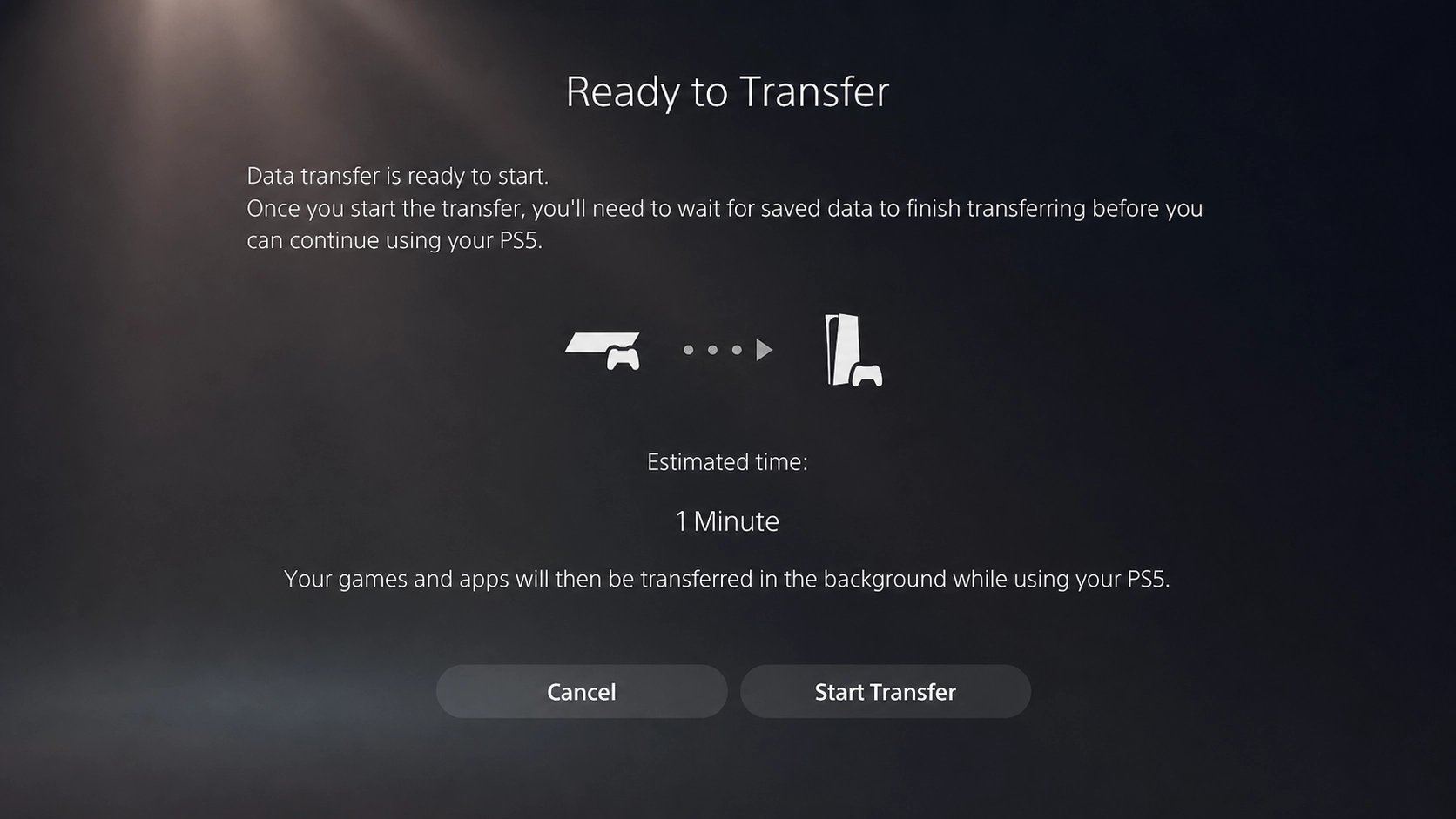
PS5 can transfer PS4 game data and saved data from a PS4 console. PlayStation supports console-to-console data transfer, and digital games can also be downloaded again from the user’s Game Library.
However, transferring a PS4 save onto your PS5 console is not always the same thing as importing that save into a native PS5 version of the game.
The process depends on the title.
Horizon Forbidden West, for example, has an explicit PS4-save import option in the PS5 game. Users transfer the PS4 save to the PS5 console and then select the PS4 import option from Horizon Forbidden West’s title screen.
Ghost of Tsushima Director’s Cut also supports transferring PS4 saved progress to the PS5 edition.
Before upgrading a game with dozens of hours of progress, therefore, confirm three things:
Do this before deleting the PS4 version or its save data.
A simple five-question test works better than assuming “PS5 = automatically better value.”
If yes, the native version is usually worth downloading unless storage or compatibility gives you a specific reason not to.
A move from 30 FPS to a stable or targeted 60 FPS can be more meaningful than small visual improvements. For action-heavy games, this factor deserves extra weight.
Director’s Cuts and remasters sometimes include expansions, new gameplay modes, accessibility additions, or bonus content. These upgrades offer stronger value than a simple resolution increase.
If you have invested 50 or 100 hours into the PS4 version, inconvenient or unsupported save migration can change the decision completely.
This is the most important question.
Paying for an impressive upgrade to a game you will never launch again has no practical value. Paying a modest upgrade fee for a game you intend to spend another 30 hours playing can be an excellent purchase.
The most common confusion around PS4-to-PS5 upgrades usually happens before the game even launches: buyers select the wrong edition, assume an upgrade is free when it is paid, overlook a region requirement, or expect a PS4 disc upgrade to work on a console without a compatible disc drive.
For disc-based upgrades, PlayStation requires a PS5 with a disc drive, and the original PS4 disc must remain inserted whenever the resulting digital PS5 version is played. A PS4 disc cannot be used to claim that upgrade on a PS5 Digital Edition without a disc drive.
For digital purchases, the purchasing PlayStation account also matters. Upgrade eligibility is attached to the entitlement on the account rather than merely to the presence of game files on the console.
When choosing a cross-generation game through PSNShop, buyers should therefore verify platform, region, edition, activation method, and whether the product includes PS4, PS5, or both versions. Clear product details and support are especially important when multiple upgrade paths exist.
From a security perspective, account credentials and activation information should also be handled carefully. Keep purchase information available until activation and any PS5 upgrade have been completed successfully, and avoid changing account-related settings without understanding what the product requires.
Games with substantial performance, loading, controller, or content improvements provide the strongest value. Horizon Forbidden West, Ghost of Tsushima Director’s Cut, The Last of Us Part II Remastered, Death Stranding Director’s Cut, and FINAL FANTASY VII REMAKE are good examples. The best choice depends on upgrade cost and whether you plan to continue or replay the game.
Not automatically. Most PS4 games already work on PS5, and selected titles can benefit from Game Boost. Upgrade when the native PS5 edition gives you improvements you actually value, such as 60 FPS performance, much faster loading, DualSense integration, additional content, or significantly better visuals.
No. Eligible upgrades can be free, paid, discounted, or subject to other conditions depending on the publisher and game. PlayStation’s official upgrade process specifically notes that upgrade offers vary by title. Always open the game’s PlayStation Store page while signed into the account that owns the PS4 version to see your actual upgrade offer.
Not if the upgrade requires your original PS4 disc. PlayStation states that PS4 game discs cannot be used with a PS5 Digital Edition that lacks a disc drive. For eligible disc upgrades on a compatible PS5, the disc generally needs to remain inserted each time you play the resulting digital PS5 version.
It depends on the game. PS4 saved data can be transferred to a PS5 console, but importing that progress into a native PS5 edition is controlled by the individual game. Titles such as Horizon Forbidden West and Ghost of Tsushima provide specific PS4-to-PS5 save-import support, while other games may use a different process.
Usually only if visual quality matters strongly to you or you are beginning your first playthrough. A paid upgrade becomes harder to justify when the PS4 version already runs smoothly on PS5 and the differences are primarily cosmetic. Frame rate, loading, new content, save compatibility, DualSense support, and upgrade price should all be considered alongside graphics.
Sign into the PS5 with the account that owns the eligible PS4 game, locate the PS5 version in PlayStation Store or the game’s hub, select the available upgrade offer, and download or purchase it as required. Disc owners need a compatible PS5 disc drive and generally must insert the original PS4 disc whenever playing the upgraded PS5 version.